The PDA Plan Scrutiny system is an online process to review building plans submitted to the Planning and Development Authority in Daman. This system helps professionals upload building drawings, check compliance with development rules, and receive an automated report within minutes.
Architects, engineers, and registered professionals can use this system after logging in to the PDA portal. If you are new to the platform, you may first need to complete the POR Application.
This guide explains how the Plan Scrutiny process works step-by-step, so applicants can submit building drawings without confusion.
Plan scrutiny is the process of checking building drawings to ensure they follow the planning rules and development regulations set by the authority.
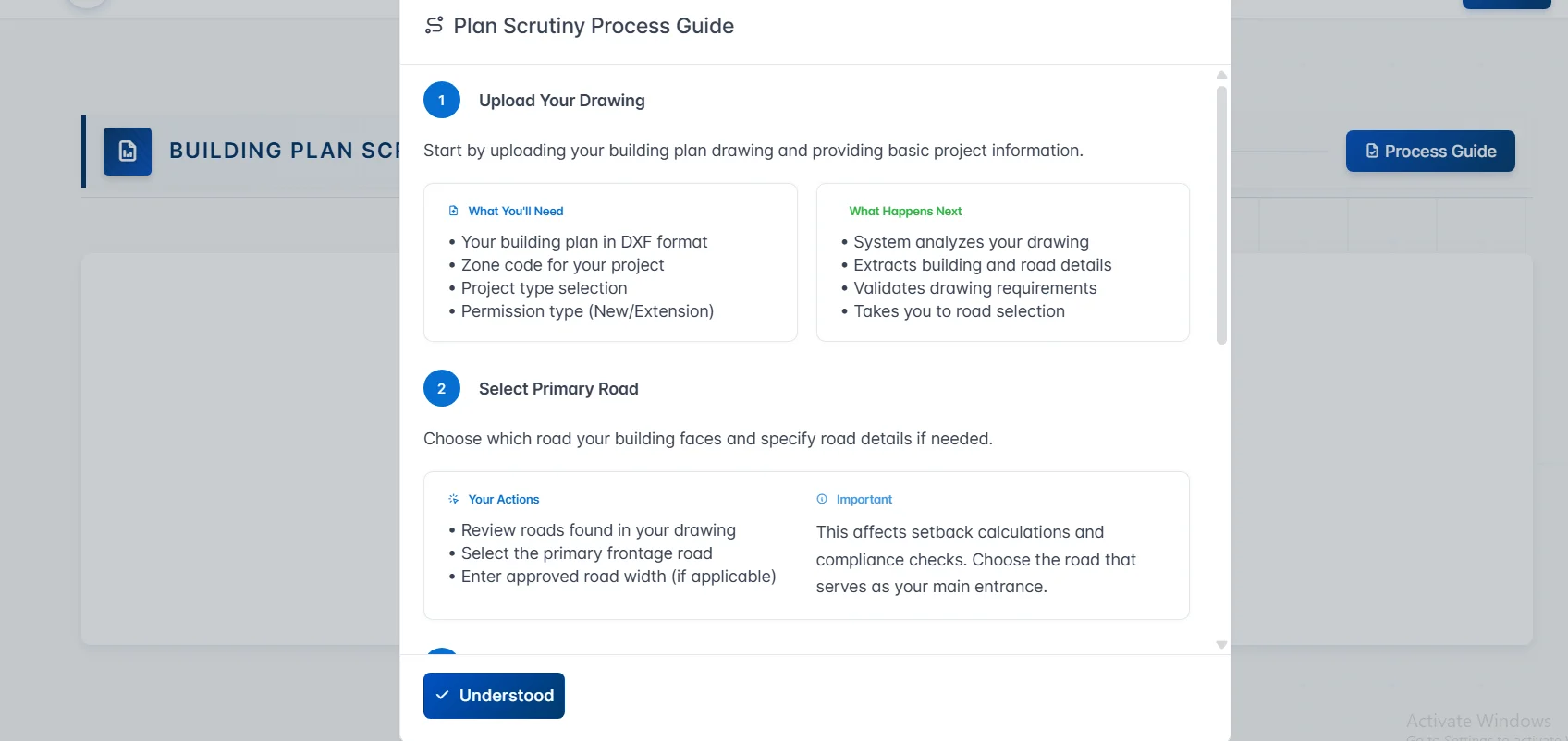
The PDA Daman login system automatically examines the building drawing and verifies important factors such as:
This automated system helps professionals quickly identify any violations or missing information before applying for construction permission. The entire scrutiny process is digital and normally takes 3 to 5 minutes, depending on the complexity of the project.
The first step in the plan scrutiny process is uploading the building drawing along with some basic project details.
Applicants must upload their building plan in DXF format, which allows the system to read and analyse the design elements.
Before starting the process, make sure you have the following information ready:
Once the drawing is uploaded, the system automatically begins analysing the plan.
After the file is uploaded, the system performs several automated checks:
If everything is correct, the system moves to the next stage of the process.
In the next step, the system identifies roads connected to the building plot from the uploaded drawing. The applicant must select the primary frontage road, which is the road that serves as the main entrance to the building.
At this stage, you must:
The road selection directly affects several planning calculations, including:
Because of this, it is important to choose the road that actually serves as the main access point to the property.
After selecting the road, the next step is to define how each building will be used. The system needs this information to calculate development permissions, safety requirements, and regulatory compliance.
Applicants need to enter the following details:
Providing accurate information in this section ensures that the plan scrutiny results are correct.
Once all the information is submitted, the system generates a detailed compliance report. This report helps professionals understand whether the building design follows the planning rules.
The plan scrutiny report provides detailed information such as:
This report helps applicants identify any issues before submitting the final project application.
One of the biggest advantages of the PDA system is speed. The entire process normally takes 3 to 5 minutes, depending on:
Applicants can also move back and forth between steps to make corrections if required.
The system is generally used by registered professionals such as:
To use the platform, the professional must usually be registered as a Person on Record through the PDA POR Application process.
After registration, professionals can access the portal through the PDA Login and start submitting building drawings for review.
To avoid errors during the scrutiny process, applicants should keep a few important points in mind.
The PDA Plan Scrutiny system makes the building plan verification process faster and more transparent for professionals working on development projects in Daman.
By uploading a DXF drawing and entering the required project details, applicants can quickly receive a detailed compliance report that highlights rule checks, calculations, and potential violations.
This digital process helps architects, engineers, and developers prepare accurate building plans before applying for construction permission.
By following the steps explained in this guide, professionals can complete the plan scrutiny process smoothly and move forward with their development projects.