
PDA Daman Feedback Portal Guide

The Feedback Portal of the Planning and Development Authority (PDA), Daman, collects feedback from citizens, businesses, professionals, and users of the portal. Your feedback helps in improving the quality, efficiency, and usability of the online services of the PDA Daman website.

If you want to report a technical issue, suggest improvements, or share general observations about your experience with the portal, this page allows you to reach the PDA team directly.

The inclusion of the public helps in improving the digital services provided by the government, and so, every comment, suggestion, or report submitted by the users helps in identifying the areas of improvement and maintaining higher service standards.

What is the Purpose of the Feedback Portal

The PDA Daman Feedback Portal acts as a bridge between the public and the authority. It allows users to share their experiences and provide constructive suggestions regarding the website and its services.

The main objectives of this portal include:

  • Improve the overall user experience
  • Identify technical issues faced by users
  • Collect suggestions for better functionality
  • Enhance transparency and service delivery
  • Encourage public participation in digital governance

The feedback provided by the users assists in making the portal more accessible, efficient and user-friendly for everyone.

Who Can Submit Feedback on PDA?

The feedback system is open to anyone who uses the PDA Daman login website or interacts with its digital services. This may include:

  • Residents of Daman
  • Architects and consultants
  • Builders and developers
  • Business owners
  • Government departments
  • General website visitors

If you have used any service or information available on the website, such as submitting applications through the PDA Plan Scrutiny system, and would like to share your experience or suggestions, you are encouraged to submit your feedback.

Guidelines for Submitting Your Feedback

To ensure that feedback submissions are useful and effective, users are encouraged to follow a few simple guidelines.

  • Provide clear and accurate information
  • Avoid submitting duplicate feedback for the same issue
  • Keep the description concise but informative
  • Use professional and respectful language

Providing detailed and relevant information helps the reviewing team process submissions more efficiently.

How to Submit Feedback on the Portal

It is very easy and convenient to submit feedback through the PDA Daman Feedback Portal. Users are only required to complete a short form and provide the necessary details.
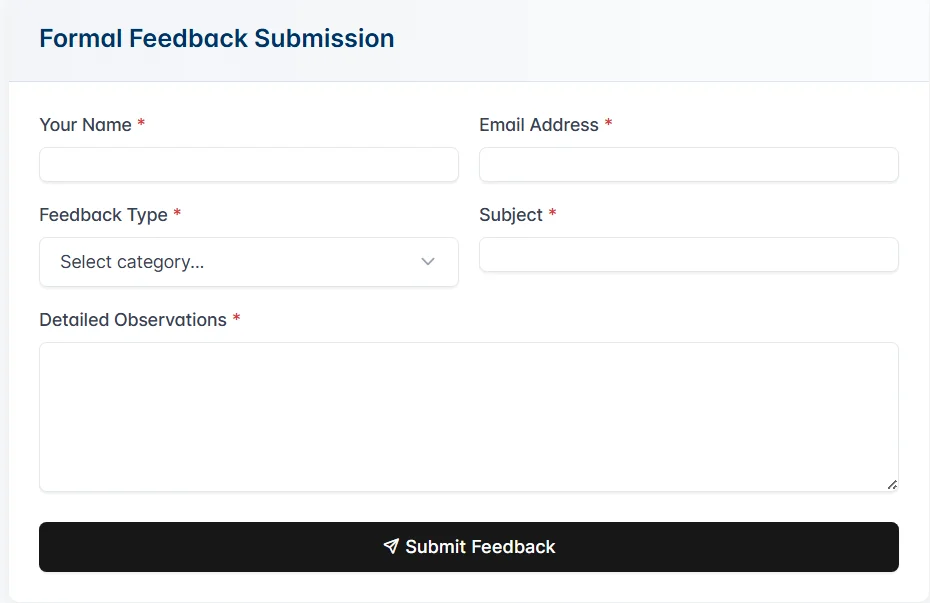
Submit feedback on PDA Daman Portal

Follow these steps to submit your feedback:

  • Step 1: Enter Your Name
    Provide your full name in the Your Name field. This helps the authority maintain records of submissions and communicate in the future if necessary.
  • Step 2: Enter Your Email Address
    Provide a valid email address so the authority can contact you if additional information is required regarding your feedback.
  • Step 3: Select Feedback Type
    Choose the appropriate category from the Feedback Type dropdown menu. Selecting the correct category helps ensure that your feedback reaches the relevant department.

They are:

  • General Observation
  • Technical Issue Report
  • Functionality Enhancement Request
  • Process Improvement Recommendation
  • Other Correspondance
  • Step 4: Add a Subject
    Enter a short and clear subject that summarises your feedback. This helps reviewers quickly understand the nature of your submission.
  • Step 5: Provide Detailed Observations
    In the Detailed Observations field, describe your feedback clearly. Include relevant details such as:
  • The issue you encountered
  • The page or feature involved
  • Steps taken before the issue occurred
  • Suggestions for improvement

For example, if you faced issues while submitting documents or downloading files like PDA certificates or accessing resource PDFs of PDA, you can describe the problem in detail.

  • Step 6: Submit Feedback
    After completing the form, click the Submit Feedback button. Your feedback will be recorded and reviewed by the concerned team.

What are the Types of Feedback You Can Submit

To ensure that feedback is properly reviewed and addressed, users can choose among various categories on the portal when submitting their comments.

1. General Observation

This category is used for submitting general comments about the website. Users can share their experience while browsing the portal, accessing information, or using available services.

Examples include:

  • Website navigation experience
  • Clarity of information on the portal
  • Suggestions related to website design or structure

2. Technical Issue Report

If you encounter any technical problems while using the website, you can report them using this category.

Examples include:

  • Pages not loading properly
  • Errors while submitting forms
  • Broken links or missing pages
  • PDA Login or access issues

Providing clear details about the issue helps the technical team identify and resolve the problem quickly.

3. Functionality Enhancement Request

Users can submit suggestions to improve the functionality of the website.

Examples include:

  • Requesting new features or tools
  • Upgrading existing services
  • Simplifying forms to use
  • Enhancing online service workflows

These suggestions are valuable in improving the usability and effectiveness of the portal.

4. Process Improvement Recommendation

This category allows users to recommend improvements in processes related to PDA services.

Examples include:

  • Simplifying approval procedures
  • Improving documentation processes
  • Reducing the steps required to access services
  • Suggestions for a better communication process

These recommendations help the authority come up with ways to make services more efficient.

5. Other Correspondence

If your feedback does not fit into any of the above categories, you can select Other Correspondence.

This category can be used for:

  • General inquiries
  • Additional suggestions
  • Comments regarding website content
  • Any other feedback related to the portal

Importance of Your Feedback

Governments need user feedback to improve the digital platforms. Your contribution in sharing your experience would assist authorities in understanding how the site is being used and where improvements should be made.

Benefits of submitting feedback include:

  • Improving website functionality
  • Enhancing service efficiency
  • Identifying technical issues early
  • Making the portal easier to use for future visitors

Constructive feedback helps build a better digital experience for all users, including those who register through the PDA portal registration page or submit applications online.

Data Privacy and Usage on PDA Feedback Portal

Information submitted through the feedback form is used only for reviewing and improving the PDA Daman website and its services.

The authority may use the submitted information to:

  • Review reported issues
  • Improve website functionality
  • Enhance user experience
  • Respond to feedback when necessary

If users need additional assistance beyond feedback submission, they may also reach the PDA helpdesk support page.

Personal information such as your name and email address will only be used for communication related to the feedback submission.

Conclusion

The PDA Daman website is continuously evolving to provide better services and information to the public. Feedback from users plays a key role in guiding these improvements.

By actively sharing your suggestions and experiences, you help the authority maintain high standards of digital service delivery and ensure that the portal remains reliable, accessible, and efficient for everyone.

Frequently Asked Questions

1. Who can submit feedback on the PDA Daman Portal?

Anyone who uses the PDA Daman website can submit feedback. This includes residents, architects, engineers, developers, business owners, and general website visitors.

2. Do I need to log in to submit feedback?

No, users can submit feedback by filling out the feedback form with their name, email address, feedback type, and detailed observations.

3. What types of feedback can be submitted on the portal?

Users can submit feedback related to general observations, technical issues, functionality improvement suggestions, process recommendations, or other correspondence.

4. Can I report technical issues through the feedback portal?

Yes. If you face problems such as login errors, broken links, or form submission issues, you can report them through the Technical Issue Report category.

5. Will my personal information remain safe?

Yes. The information submitted through the feedback form is only used for reviewing feedback and improving the website services. It is not shared publicly.